
Verification Status: This article is based on publicly available information (no actual use or trading by the editorial team).
Zero Installation. A Network Line You Can Use for Work the Day It Arrives
What Tanaka wanted most was "a network line that requires no installation and can be used the day it arrives." For freelancers, spending several days before a deadline setting up an internet connection is nothing short of a loss of opportunity. For those living alone, moving frequently, or traveling often on business or vacation, fixed-line installation is becoming an outdated option.
Pocket WiFi is precisely the device that solves this problem. Unlike stationary models that only need to be plugged into an outlet, pocket WiFi can be carried in your pocket, allowing you to use the same connection at home or on the go. The Giga WiFi stands out among pocket WiFi devices for adopting a "cloud SIM system." This mechanism automatically switches between the four major carriers—SoftBank, Docomo, au, and Rakuten Mobile—to capture the optimal signal. With no installation required and same-day shipping available, the convenience of being able to start working the very next day after signing up strongly appealed to him.
Giga Wi‑Fi’s Simple and Aggressive Pricing
Giga Wi‑Fi’s biggest selling point is its simple, no‑nonsense pricing that doesn’t require you to wrestle with complex options or discount conditions. The first thing he checked was which plan would best fit his usage.

Giga Wi‑Fi offers two main plans: the Large Plan for those who want to use data without worrying about limits, and the Mini Pay‑As‑You‑Go Plan for users who want to keep costs down during months with low data usage.
| Item | Large Plan | Mini Pay‑As‑You‑Go Plan |
|---|---|---|
| Monthly Fee (tax incl.) | ¥2,695 | ¥550 – ¥1,540 (tiered) |
| Data Allowance | Up to 100 GB/month | Up to 20 GB/month (service stops if exceeded) |
| Initial Fee | ¥3,300 | ¥3,300 |
| Contract Term | 2‑year contract (auto‑renewal) | 2‑year contract (auto‑renewal) |
| Cancellation Fee | ¥16,500 (if cancelled within 2 years) | ¥550 (if cancelled within 2 years) |
| Payment Method | Credit card only | Credit card only |
The Large Plan gives you a generous 100 GB of data per month for just ¥2,695 – a very aggressive price even when compared to competing services we’ll discuss later. The Mini Pay‑As‑You‑Go Plan, on the other hand, uses a tiered structure: ¥550 if you use less than 5 GB, ¥1,045 for under 10 GB, and ¥1,540 for up to 20 GB. For light users who mainly browse the web, use email, and social media – without heavy video streaming or large file downloads – this is a waste‑free option.
One thing to keep in mind is that payment is by credit card only, and the plan is based on a 2‑year auto‑renewing contract. We’ll take a closer look at these contract terms later. For now, let’s explore the specific pros and cons of this low‑price offering and what value it can bring you. Even just checking the latest plan details on the official website will give you more to go on when deciding if it’s right for you.
An Honest Look at the Pros and Cons of Giga Wi-Fi
Based on public information and reviews from multiple user feedback sites, opinions on Giga Wi-Fi are sharply divided between "low pricing" and "communication speed and support quality." Behind the word "cheap," there is always a reason. He believes that understanding both the good and bad sides, rather than jumping in based only on the positives, is the shortcut to making a choice you won't regret.
Pros: Cost Performance and Convenience
| Advantage | Why It Matters |
|---|---|
| Low-tier pricing at ¥2,695/month for 100GB of data | Getting 100GB per month for ¥2,695 is economical, whether as a substitute for a fixed-line connection or compared to other pocket Wi-Fi services. |
| No 3-day data cap | Unlike many budget SIMs and some Wi-Fi services that throttle speed after using a certain amount of data in the last 3 days, you can enjoy video streaming and gaming without worry. |
| Automatic switching between 4 carriers | Since it doesn't rely on a single carrier, the risk of "no connection" in certain locations is reduced. |
| Usable in 134 countries as is | No need to sign up for an overseas option or buy a local SIM. You can connect to the internet on your usual device the moment you arrive. |
| No installation required, ships the same day | The speed of being able to start using it right after signing up is ideal for right after a move or for sudden business trips. |
Cons: Complaints About Speed and Support
| Disadvantage | What Users Are Actually Saying |
|---|---|
| Communication speed can feel slow at times | Multiple review sites report that users feel the communication speed is slower compared to other pocket Wi-Fi services. |
| Weak support system | There are complaints that when contacting support during issues, the assistance received is not as thorough as expected. |
| 2-year contract lock-in and high cancellation fee | Canceling the large-capacity plan within 2 years incurs a ¥16,500 fee, and some reviews mention the "hassle of the 2-year contract lock-in." |
| Device specs lag behind competitors | Some reviews point out that the device's processing performance and battery life are inferior to those of competing services. |
When gathering user reviews, the following raw opinions come through:
"The price is low and it offers good value for money." (From multiple review sites)
"Being able to use up to 100GB per month is great." (From multiple review sites)
On the other hand, these complaints also definitely exist:
"The communication speed feels slow." (From multiple review sites)
"The weak support is frustrating." (From multiple review sites)
To address these concerns about "speed" and "support," he decided to move forward with a comparison against competing services.
Thorough Comparison with Competitors: Giga Wi-Fi is the Best Choice if Cost is Your Top Priority
You want to avoid picking a plan based solely on price, only to regret it later with "This isn't what I expected." To clarify Giga Wi-Fi's position, we've created a comparison table with major competing and alternative services. The comparison axes are: monthly fee, data capacity, contract commitment, and overseas usability.
| Service Name | Approximate Monthly Fee (tax incl.) | Approximate Data Capacity | Contract Commitment | Overseas Use |
|---|---|---|---|---|
| Giga Wi-Fi | ¥2,695 | 100GB/month | Yes (2 years) | 134 countries supported |
| Pitatto Wi-Fi | From ¥2,728 | 100GB/month | Yes (varies by usage period) | Supported |
| Cloud WiFi | Not disclosed | 100GB/month | None | Not disclosed |
| WiMAX | Not disclosed | Unlimited (with speed throttling conditions) | Yes | Not disclosed |
| Rakuten Mobile | From ¥3,278 | Unlimited (with speed throttling conditions) | None | Supported |
This comparison reveals several important facts.
- Giga Wi-Fi if cost is your top priority: No other service offers 100GB of monthly data at this low price. Pitatto Wi-Fi is in a similar price range, but Giga Wi-Fi is slightly cheaper, making it the strongest candidate for those seeking cost performance.
- Choose Cloud WiFi or Rakuten Mobile to avoid contract commitments: Giga Wi-Fi's biggest weakness is its 2-year contract commitment. If you need short-term use or the freedom to cancel anytime, you should choose a service with no contract commitment.
- Choose WiMAX if speed and stability are your top priorities: WiMAX has its own antennas, so its communication quality is rated as stable. Data capacity is also unlimited, but there are speed throttling conditions based on fair usage policies, so check the official website for details.
Ultimately, Giga Wi-Fi is an unbeatable option for anyone who can accept that "¥2,695 per month for 100GB is enough." Since his main uses are web conferencing and sending/receiving design data, not 4K video streaming, he found Giga Wi-Fi's cost performance very appealing. The ¥2,695 monthly fee is less than half the cost of a fixed line. There's also the ease of trying it out with only a ¥3,300 initial fee as the risk.
The Reality of Communication Speed and "Connection" Issues
Giga Wi-Fi's speed is sufficient for light users but unsuitable for heavy users. The questions that everyone inevitably pauses to consider are: "Will it really connect properly?" and "Isn't the speed too slow?" He, too, wanted to avoid the risk of his line dropping during web conferences with clients.
According to publicly available information, the average actual measured speed of Giga Wi-Fi is around 20.64 Mbps. Honestly, this figure falls short when compared to other services that boast high-speed communication. In fact, some user reviews have reported that "Giga Wi-Fi sometimes doesn't connect."
However, whether this speed feels "slow" depends on how you use it. With 20 Mbps, you can comfortably handle web conferences via Zoom or Teams, as well as watching YouTube videos in HD quality (1080p). While it is not suitable for heavy users who frequently upload or download large files, or for those who want to enjoy 4K video without stress, it can be judged that for the normal work of a web designer like him, there are no major practical issues.
As for the "connection" problem, the strength of the cloud SIM system comes into play. Since it automatically switches between four lines—SoftBank, docomo, au, and Rakuten Mobile—even if a specific carrier is out of range, there is a high probability that the connection can be maintained by picking up another carrier's signal. This provides a sense of security that services dependent on a single line cannot offer. However, in places where it is difficult for any carrier's signal to reach, such as underground areas or mountainous regions, the connection will naturally become unstable. This point must be understood as a physical limitation.
Are the Contractual Obligations and Cancellation Fees Really That High?
A two-year contract isn't necessarily a drawback if you're planning to use the service long-term. Behind the low pricing of Giga Wi-Fi lies this contract period and the associated cancellation fees. He hesitated to sign up after reading reviews saying, "The two-year contract is a hassle." This concern can be resolved by properly understanding the actual terms of the agreement.

Giga Wi-Fi's cancellation fee is 16,500 yen for the high-volume plan and 550 yen for the mini pay-as-you-go plan. This fee applies if you cancel before completing the two-year contract term. Looking solely at the 16,500 yen figure for the high-volume plan, it may indeed seem expensive.
However, let's consider the meaning of this fee in terms of total cost. If you cancel after one year, the total cost for the high-volume plan would be: (monthly fee of 2,695 yen × 12 months) + cancellation fee of 16,500 yen + initial fee of 3,300 yen, totaling 52,140 yen. Dividing this by 12 months gives an effective monthly cost of approximately 4,345 yen. Whether you view this as expensive or acceptable depends on your usage period and personal values.
The key point is that if you use the service for the full two years, this cancellation fee does not apply at all. Giga Wi-Fi is designed to maximize cost benefits for people who "have no plans to move and can use it consistently for two years." Conversely, for those who want to review their contract every few months or whose usage period is uncertain, it would be safer to choose another service without contract obligations.
Surprisingly Simple Process from Application to Use
Applying for Giga Wi-Fi is surprisingly easy. After thoroughly verifying the fees, speeds, and contract terms, he concluded that Giga Wi-Fi suited his work style. The final hurdle was the complexity of the application process. However, the process is completed in just five steps, as is typical for pocket Wi-Fi that requires no installation.
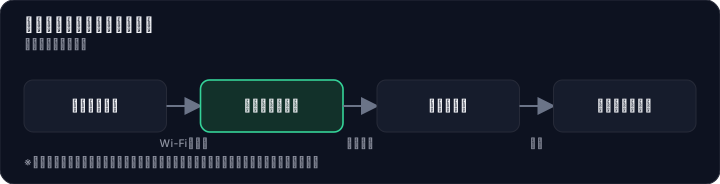
- Apply from the official website: First, go to the official website and select your desired plan (Large Capacity Plan or Mini Pay-As-You-Go Plan), then enter required information such as your name and address. Payment is by credit card only, so have your card ready.
- Confirmation call from a specialist: Once your application is complete, a specialist will call you for final confirmation. You can use this opportunity to verify that the contract details are correct and address any concerns.
- Register payment info and verify identity: After the phone confirmation, register your credit card information and upload identification documents such as your driver's license via the link provided on the completion page or in the email.
- Device shipped as soon as same day: Once identity verification is complete, the device is shipped. Depending on the timing of your application, it may be shipped the same day, which is a major benefit for those in a hurry.
- Just turn on the power and start using immediately: When the device arrives, there is no need to insert a SIM card. Simply turn on the device, and it will automatically search for and connect to the optimal network. No troublesome initial setup is required—you can take it out of the box and start working right away.
This ease of use is the greatest appeal of pocket Wi-Fi that requires no installation. With no construction needed, an initial cost of only 3,300 yen, and the ability to start using it for free from the day it arrives with same-day shipping, the barrier to getting started is extremely low, making you feel like "let's give it a try."
So, Who Is Giga Wi-Fi Actually For?
After reviewing all the information, Kenta Tanaka decided to sign up for Giga Wi-Fi's high-capacity plan. What ultimately pushed him over the edge was the certainty that it "perfectly fit his usage." So, let's clarify exactly who Giga Wi-Fi is for, and who it is not for.
Who Giga Wi-Fi Is For
- People who prioritize cost above all else: The outstanding cost performance of 100GB for just ¥2,695/month is ideal for single working professionals or students looking to cut fixed expenses.
- People who plan to stay in the same place for two years: Instead of seeing the contract commitment as a drawback, they can enjoy the cost benefits of long-term use.
- People who travel abroad or go on business trips frequently: The convenience of being usable immediately in 134 countries and regions with no extra charges is a strength not found in other pocket Wi-Fi options.
- Light to moderate users who mainly watch videos or attend web meetings: If speeds around 20Mbps are sufficient for your needs, you'll have little to complain about.
Who Giga Wi-Fi Is NOT For
- People who prioritize speed and stability above all else: Heavy users who require fast, high-capacity communication, such as for online gaming or frequent 4K video streaming, should consider other options like WiMAX.
- People who only want to use it for a short period: If you only need it for a few months, the 2-year contract commitment and high cancellation fees are major drawbacks. Cloud WiFi services with no contract lock-in would be more suitable.
- People who want extensive customer support: Those who are anxious about network setup or want to resolve issues quickly over the phone may find the limited support stressful.
In his case, Giga Wi-Fi perfectly matched his three conditions: "being able to work anywhere," "wanting to keep fixed costs down," and "needing it to work overseas." His story teaches us that the perspective of "whether it fits your work style," which cannot be measured by specs alone, leads to the optimal choice.
The content of this article is based on publicly available information as of July 2026. Rate plans and campaigns are subject to change without notice. Furthermore, communication speeds can vary significantly depending on your usage environment, time of day, and network congestion. When comparing with other services that advertise "unlimited" data, please note that each company's fair usage policy and speed throttling conditions differ. Please check the latest terms on the official website.
Methodology and Disclosure
Verification Method: This article is based on publicly available information confirmed as of 2026-07-30. The editorial team has not actually subscribed to or used the services in question. This is an explanation based on publicly available information (official websites, third-party reviews, and user feedback). Service details, fees, and promotions are subject to change, so please check the official information before applying.
Publisher Information: The editorial policy and evaluation criteria for this article are described in the Editorial Policy, and the verification procedures are outlined in the Evaluation Method. If you find any errors, please report them to our contact desk.
Affiliate Disclosure: This article contains affiliate links, and our site may receive compensation without any additional cost to readers. Compensation does not affect the evaluation content.
Frequently Asked Questions
What is the actual speed of Giga Wi-Fi?
User reviews mention occasional slowness, but the automatic switching between 4 carriers reduces location-based risks. Video streaming and gaming are usable without 3-day throttling, though congestion may cause slowdowns.
Should I choose the large capacity plan or the mini pay-as-you-go plan?
If you need up to 100GB per month for video streaming or large files, choose the large capacity plan (¥2,695/month with conditions). For email and social media, the mini pay-as-you-go plan (¥550–¥1,540) is more cost-effective.
Is there always a cancellation fee?
The large capacity plan charges ¥16,500 if canceled within 2 years. The mini pay-as-you-go plan charges ¥550 if canceled within 2 years. After 2 years, the plan auto-renews, but cancellation outside the renewal month incurs a fee.
Can I use Giga Wi-Fi overseas without extra charges?
Yes, it works in 134 countries without additional options or a local SIM. You can connect immediately upon arrival using your usual device, making it convenient for business trips and travel.
Is credit card the only payment method?
Yes, Giga Wi-Fi only accepts credit cards. Debit and prepaid cards are not supported, so you need a credit card before signing up.
Is construction required for installation?
No construction is needed. As a pocket WiFi device, you just plug it into a power outlet. It ships the same day in many cases, so you can have internet access the next day.
How long does shipping take?
Same-day shipping is available. Depending on order time and stock, delivery usually takes 1–2 days, so you can start using it quickly.
Are there data caps or throttling?
The large capacity plan has a 100GB monthly cap, and the mini pay-as-you-go plan has a 20GB cap. There is no 3-day throttling, so video and gaming are worry-free. Exceeding the cap results in speed reduction or service suspension.
Sources
This article is based on publicly available information as of 2026-07-30.
Related articles
XM Review 2026: Video Walkthrough, Spreads & Bonus Terms Explained
XM review 2026 with full video walkthrough. Regulated broker, spreads from 0.6 pips, no-deposit bonus explained. ✓ Verdict for beginners ✓ Risk disclosure ✓
Measured broker spreads 2026-W41 — logged hourly from our own MT5 accounts
Not a copy of published spread tables: 184,090 hourly bid/ask samples taken on our own accounts (HF Markets (SV) Ltd. / OANDA Corporation / XM) over 2026-09-27 → 2026-10-04, broken down by pair and by hour of day.
Fujitsu vs KDDI AccelWaves vs SCS: Enterprise Security 2026 Guide
Compare Fujitsu MSS, KDDI AccelWaves SASE, and SCS certification for Japanese enterprises. Find the right fit with our 2026 decision guide ✓