
Verification Status: This article is an explanation based on publicly available information (no actual usage or trading by the editorial team).
"Another IP to add... Every time a new member joins, updating the client's allowlist is really pushing its limits."
Tanaka (a pseudonym), a project manager at a Tokyo-based web production company, let out a big sigh after finishing the evening regular meeting. His team consists of five employees plus three external freelancers. Due to security policies, the client's staging server has IP address-based access restrictions. Every time a member connects from home or a coworking space, the task of adding each individual IP to the allowlist was slowly eating into the project's progress.
"We can't afford to loosen security. But it's counterproductive if managing IPs ends up stalling our core work."
Tanaka was facing an invisible wall called "IP restrictions" that many small and medium-sized teams encounter in today's era of normalized remote work.
With a "group-dedicated VPN" that allows multiple people to share the same fixed IP, you can consolidate the allowed IPs and enable the entire team to access the company server from a single IP. The fact that you can test the actual operational feel risk-free with a free trial of up to two months is also a major plus.
The "IP Management Fatigue" Eating Away at Remote Teams
In Tanaka's team, every client project required adding access permissions for the staging server. But each team member connected from a different IP address — one from home fiber, another from a mobile hotspot, and yet another from a coworking space's Wi-Fi. And since none of these were static IPs, the addresses would change every time someone rebooted their router or switched networks. The result: a constant stream of Slack notifications saying "I can't connect," followed by Tanaka having to update the IP allowlist over and over again.
"It's just a few minutes each time," he said. "But when it happens several times a week, those small chunks of time get eaten up, and I can't focus on my actual work. What really wore me down was the security team telling me, 'Your allowlist has way too many IPs.'"
Similar frustrations appear frequently across review sites. The ability for multiple team members to share a single static IP seems to be the biggest reason companies start looking into group VPNs. One VPN comparison site noted: "If multiple people need to share the same static IP, it's better to choose a solution designed for team use from the start — otherwise you'll end up redoing everything later."
What Tanaka truly needed was exactly this: a single, unified IP. If every team member could access the server through the same static IP, only one address would need to be on the allowlist. Adding new members would be as simple as issuing them the same VPN account. Freed from the burden of IP management, project workflows would run far more smoothly. Convinced of this, Tanaka began his serious search for a team-dedicated VPN.
How “Unified Permitted IPs” Works and What It Costs
A dedicated group VPN is a service that lets your team exclusively use a VPN server assigned a single fixed IPv4 address. Since multiple people can share the same fixed IP simultaneously, it allows secure access to internal file servers on the corporate network or external systems with IP restrictions from outside the office.
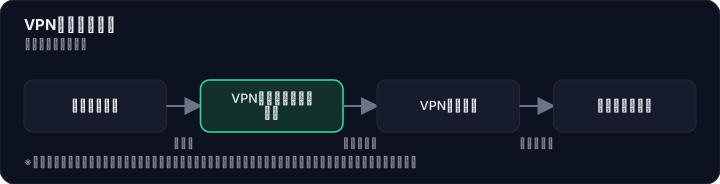

According to the official website, the standard plan includes 10 accounts and starts at ¥5,500/month (tax included). You can add up to 200 accounts, allowing flexible scaling as your team grows. Supported protocols include PPTP, L2TP, OpenVPN, and IKEv2, plus a browser extension is also available. Since it covers major operating systems like Windows, macOS, Android, and iOS, it can be deployed regardless of team members' device environments — a clear advantage.
You can also choose the "Dedicated Group VPN WG" plan, which uses the high-speed VPN protocol "WireGuard," or the "WG+NGN" plan, which enables high-volume data transmission via NTT's NGN network. The WG+NGN plan costs ¥8,800/month (tax included), which is more expensive than the standard plan, but it's a worthwhile option for teams that handle large file transfers or high-load tasks involving multiple people.
On the management side, a dedicated control panel lets you intuitively handle account creation and suspension, IP restrictions, and protocol control. Since devices connected to the VPN can also communicate with each other, it can be used like an internal LAN — a reassuring feature for remote teams.
After reviewing the specs and pricing of the standard plan, Tanaka felt that "10 accounts for ¥5,500/month fits our team size." Best of all, since there's a free trial of up to two months, you can test actual connectivity and speed with your team before making a decision. For the latest plan details and to sign up for the free trial, check the official website.
A Frank Look at the Pros and Cons
When considering the introduction of a group-dedicated VPN, Mr. Tanaka calmly organized both the advantages and disadvantages. Based on information from multiple VPN comparison sites and official sources, the key points are summarized in the table below.
| Pros | Cons |
|---|---|
| Multiple users can share the same fixed IP, allowing you to consolidate allowed IPs into a single one | If you are the only one who needs a fixed IP, a personal fixed IP is simpler and cheaper |
| Since you have a dedicated server all to yourself, stable operation is possible | For full-scale company-wide deployment, server load may cause a drop in connection speed |
| Offers a free trial of up to 2 months, with no contract lock-in or cancellation fees | Supports up to 200 accounts, but large-scale deployment may require adjustments |
| The WG plan using WireGuard features high connectivity and automatic reconnection | The WG+NGN plan costs 8,800 yen per month, which is more expensive than the standard plan |
| Account management and IP restrictions can be flexibly handled from the control panel | If requirements are very heavy and fine-grained control is needed in a dedicated environment, it may be insufficient in some cases |
The core advantage is, without a doubt, the "consolidation of allowed IPs." Since multiple users can share the same fixed IP, you only need to register one IP on the client's allowlist. Even when members are added or replaced, you simply issue a VPN account. For a manager of a small team like Mr. Tanaka, the dramatic reduction in IP management effort is invaluable.
On the other hand, there are points to be aware of. One VPN comparison site noted, "If you are the only one who needs a fixed IP, a personal fixed IP is simpler." Additionally, another review site mentioned, "While up to 200 accounts can be connected, this may put a load on the server and slow down the connection speed." For large-scale company-wide deployment, opting for a high-speed plan like the WG+NGN plan or conducting a load test in advance would be effective.
While some concerns have been raised about "aggressive sales tactics," in reality, there are no contract lock-ins or cancellation fees, and you can cancel at any time. Whether to continue after the free trial is entirely left to the user's discretion.
User Reviews: Real-World Impressions
What do actual users think of the group-specific VPN? Looking at reviews posted on multiple review sites and blogs, positive opinions stand out, with particular praise for "shared fixed IP for multiple users" and "the generous free trial." On the other hand, there are also some concerns about "speed drops with large-scale usage."
If you're going to use a shared fixed IP with multiple people, a solution designed from the start for team use reduces rework. —— From a VPN comparison site
This review hits on exactly the issue Tanaka was feeling: "the limits of personal VPNs." Rather than signing up for individual fixed IP options for each team member, a group-specific VPN designed for team use makes it easier to optimize both management effort and costs.
In actual testing, even on a standard Tokyo apartment VDSL line, speeds that were around 30 Mbps with traditional L2TP/IPsec jumped to over 200 Mbps just by switching to the WG+NGN setup. —— From a tech blog
This report demonstrates the speed advantage of the WG+NGN plan. For teams handling large files, this performance difference directly impacts work efficiency. Tanaka also started thinking, "For our team, which deals with a lot of creative data, the WG+NGN plan might be a better fit."
Up to 2 months free trial (for up to 10 accounts). No cancellation fees, cancel anytime. No long-term contract required. —— From a VPN information blog
This review highlights the generous free trial period and flexible contract terms. With up to 2 months, the entire team can thoroughly test the service in their actual workflow. Tanaka felt, "This way, we can virtually eliminate the risk of it 'not working' before committing."
However, there are also cautionary reviews:
While you can get up to 200 accounts, speeds may drop if all are used simultaneously. —— From a VPN comparison site
Regarding this point, the group-specific VPN also offers the high-speed WG+NGN plan as an option, allowing users to choose a plan suited to their team's size and needs. Since Tanaka's team has fewer than 10 members, they judged the standard plan to be sufficient.
How to Choose "Team Operation" Based on a Competitive Comparison
To make the features of Group Dedicated VPN clearer, we have created a comparison table with its main competitors: "MillenVPN Dedicated" and "DareRemo VPN." The data is based on publicly available information from each company's official website and various VPN comparison sites (as of July 2026).

| Comparison Item | Group Dedicated VPN | MillenVPN Dedicated | DareRemo VPN |
|---|---|---|---|
| Monthly Fee (tax incl.) | From ¥5,500 (standard 10 accounts) | From ¥6,930 | — |
| Initial Fee & Contract Term | No lock-in, no cancellation fee | — | — |
| Number of Simultaneous Accounts | Standard 10, up to 200 | — | — |
| Shared Fixed IP | Multiple users can share the same fixed IP | Dedicated server type (for heavier requirements) | Simple remote access device, just plug it in |
| Management Features | Control panel for IP restrictions & protocol control | — | Can be set up without specialized knowledge |
| Supported Protocols | PPTP/L2TP/OpenVPN/IKEv2/WireGuard/Browser extension | — | — |
| Free Trial Period | Up to 2 months | — | — |
| Best Suited For | Teams that want to share a fixed IP and centralize allowed IPs | Teams needing heavier requirements or a dedicated environment | Teams unfamiliar with VPN setup who prioritize ease of use |
What this comparison reveals is that Group Dedicated VPN has a very clear strength in one specific area: "sharing a fixed IP among multiple people." MillenVPN Dedicated is a dedicated server type that can handle heavier requirements, but it is more expensive and not specifically designed for team-based fixed IP sharing. DareRemo VPN is attractive for its ease of use without specialized knowledge, but information is limited regarding fixed IP sharing.
For a team like Mr. Tanaka's—where "a small number of people, but if everyone can access using the same fixed IP, it eliminates the hassle of IP management"—the standard plan of Group Dedicated VPN is the best fit. Since you can test the actual user experience with a free trial, it's definitely worth trying as a final step in your comparison.
From Free Trial to Implementation: The Step Tanaka Took
After completing his comparison, Tanaka proposed introducing a dedicated group VPN to his team and decided to start with a free trial. The application process outlined on the official website consists of the following four steps:
Step 1: Apply via the Official Website Select the free trial of up to two months, fill in the required information, and submit your application. No credit card registration is needed—you can get started with just basic details like your name and email address. This simplicity is a welcome point for busy administrators.
Step 2: Create Accounts Once the application is complete, you gain access to the admin control panel. Here, you issue VPN connection accounts for all team members. Up to 10 accounts can be created by default. Tanaka issued a total of 8 accounts for 5 employees and 3 freelancers, leaving the remaining 2 accounts for future new members.
Step 3: Configure Clients Each member installs the VPN client on their device and configures the connection using the issued account information. Since the supported operating systems are extensive, both Windows and Mac users were able to follow the same instructions. Tanaka prepared a simple manual on the company wiki, and he reports that almost no inquiries about setup came in.
Step 4: Verify the Connection While connected to the VPN, use an IP verification site to confirm that everyone is communicating through the same fixed IP. Additionally, the entire team tested access to the actual staging server to ensure it was not blocked by IP restrictions. With the connection working smoothly, Tanaka felt confident that "this will free us from the stress of IP management."
During the free trial, you can also contact support. If the connection doesn't work properly or you're struggling with setup in a specific environment, there's no need to insist on solving it yourself. With a generous two-month trial period, you can avoid busy seasons and thoroughly test the service—a thoughtful consideration for team operations.
Summary: Why a Group Dedicated VPN Is the Right Choice for Teams Tired of IP Management
A group dedicated VPN is the ideal solution for teams that need to share the same fixed IP and consolidate their allowlisted IP addresses. The reasons are clear from publicly available information.
First, the architecture of a dedicated server ensures stable operation. Second, the combination of a free trial of up to two months and no contractual commitment allows you to test the service in your actual workflow while minimizing implementation risk. These two advantages are unique to a team-oriented solution—something that cannot be achieved by simply piecing together consumer VPNs.
On the other hand, if you are the only one who needs a fixed IP, a personal fixed IP service may be simpler and more affordable. Additionally, if you are considering a large-scale company-wide rollout, it would be advisable to choose a high-speed option like the WG+NGN plan or conduct a load test beforehand. Carefully assessing your team's size and needs will lead to the best choice.
After the free trial, Tanaka decided to sign a full contract for the group dedicated VPN. Now, even when a new member joins, all it takes is "issuing one VPN account." He has freed himself from the hassle of IP management and gained an environment where he can focus on project progress.
"If multiple people are going to use the same fixed IP, it's better to design it from the start for team use—it reduces rework." This quote from a VPN comparison site perfectly captures the essence of a group dedicated VPN. For teams tired of the complexity of IP management, why not start with a free trial and experience its value firsthand?
The content of this article is based on publicly available information as of July 2026. VPN connection speeds and stability may vary depending on your internet environment and team usage. Additionally, pricing plans and terms of service are subject to change without notice. For the latest information, please check the official website.
Methodology and Disclosure
Verification Method: This article is based on publicly available information as of July 28, 2026. The editorial team has not personally subscribed to or used the services mentioned. This is an explanatory article based on publicly available information (official websites, third-party reviews, and user feedback). Service details, fees, and promotions are subject to change, so please check the official information before signing up.
Publisher Information: The editorial policy and evaluation criteria for this article are described in the Editorial Policy, and the verification methods are outlined in the Evaluation Methodology. If you find any errors, please report them to our contact desk.
Affiliate Disclosure: This article contains affiliate links, and our site may receive compensation at no additional cost to readers. This compensation does not affect the content of our evaluations.
Frequently Asked Questions
Is the group VPN free trial really free for 2 months?
Yes, a free trial of up to 2 months is available. There are no contract commitments or cancellation fees, so you can test the service risk-free. However, please check the official website to confirm whether the trial automatically converts to a paid plan after it ends.
What is the additional cost if I exceed 10 accounts?
The standard plan includes 10 accounts for ¥5,500/month (tax included). You can add up to 10 more accounts, but the exact additional fees vary by conditions. Please check the official website for details.
Is the setup difficult? Can I use it without technical expertise?
The dedicated control panel is intuitive to operate, and apps are available for major operating systems. Even without technical knowledge, you can follow the guides to set it up easily.
Are there persistent sales calls or pushy solicitations?
There are no contract commitments or cancellation fees, and you can cancel anytime. The article does not report any aggressive sales calls, but please review the official website's terms of service for confirmation.
For individual use, should I choose a group VPN or a personal fixed IP?
If you are the only one needing a fixed IP, a personal fixed IP is simpler and more affordable. A group VPN is best when sharing with multiple people.
Does the WG+NGN plan really improve speed?
The WG+NGN plan routes traffic through NTT's NGN network to achieve high capacity, making it faster than the standard plan. However, it costs ¥8,800/month (tax included) and is suitable for large file transfers or high-load tasks.
Can I connect from overseas using a Japanese fixed IP?
Yes, the group VPN supports major operating systems, allowing you to connect from overseas with a Japanese fixed IP. However, speed may vary depending on your local network environment.
Are there any cancellation fees?
According to the article, there are no contract commitments or cancellation fees. However, please check the latest terms of service on the official website.
Sources
This article is based on publicly available information as of 2026-07-28.
Related articles
XM Review 2026: Video Walkthrough, Spreads & Bonus Terms Explained
XM review 2026 with full video walkthrough. Regulated broker, spreads from 0.6 pips, no-deposit bonus explained. ✓ Verdict for beginners ✓ Risk disclosure ✓
Measured broker spreads 2026-W41 — logged hourly from our own MT5 accounts
Not a copy of published spread tables: 184,090 hourly bid/ask samples taken on our own accounts (HF Markets (SV) Ltd. / OANDA Corporation / XM) over 2026-09-27 → 2026-10-04, broken down by pair and by hour of day.
Fujitsu vs KDDI AccelWaves vs SCS: Enterprise Security 2026 Guide
Compare Fujitsu MSS, KDDI AccelWaves SASE, and SCS certification for Japanese enterprises. Find the right fit with our 2026 decision guide ✓