Verification Status: This article is an explanatory piece based on publicly available information (no actual usage or trading by the editorial team).
In a rented apartment room, Kenta Tanaka (28, sales professional) lets out a small sigh every time his smartphone's tethering disconnects. When trying to download documents at a hotel on a business trip, he's greeted by the words "data limit." Back home, his landlord has told him, "No installation of a fixed line is allowed." His monthly phone bill alone is already heavy, yet he can't justify paying thousands of yen every month for an internet line he may or may not use.
That's when Tanaka stumbled upon an option online: a "pay-as-you-go pocket WiFi." What particularly caught his eye was NeoCharge WiFi. Zero monthly fee, no contract, and you only top up data when you need it—this setup might just fit his work style. So Tanaka decided to look into it further.
Conclusion: NeoCharge WiFi is the ideal choice for those who use little data each month and want to avoid contract commitments. Its pay-as-you-go model—zero cost in months you don't use it and the convenience of topping up data only when needed—has earned high praise across multiple review sites.
Options for "I Want Internet Without Construction"
Mr. Tanaka's concerns boil down to three main points: "I can't have construction done at home," "I need internet even on business trips," and "I don't want to increase my monthly expenses." The first solution that comes to mind for solving all three at once is a pocket WiFi. Among these, a new category that has been gaining attention recently is the "pay-as-you-go" type, which incurs no monthly fees.
Traditional pocket WiFi typically costs around 4,000 to 5,000 yen per month in rental fees and is usually tied to a 2- or 3-year contract. Even in months you don't use it, you still pay, and canceling the contract means paying a penalty. For frequent business travelers or people living alone who can't install a fixed line at home, this inevitably feels like a "waste of money."
NeoCharge WiFi is a service that completely eliminates these frustrations. Once you purchase the device, there are no monthly fees. You only charge data (gigs) when you need it, at your preferred timing. Since it automatically connects to the three major carrier networks—docomo, au, and SoftBank—you don't need to worry about coverage. For someone like Mr. Tanaka, who wants to "use it quickly only when needed," this seems like the perfect option.
NeoCharge WiFi Pricing and Specs: A Simple, No-Frills Design
When Tanaka heard "one-time purchase model," the first things he looked into were "device performance" and "actual costs." Upon researching, he found that NeoCharge WiFi's system is surprisingly simple, with unnecessary costs thoroughly eliminated.

First, the device is the FREEBOT SE01 (macaroon) model. It features a large 4,000mAh battery, allowing for approximately 20 hours of continuous use—reassuring for business trips where you don't want to worry about charging. It supports up to 10 simultaneous connections, so you can connect your smartphone, laptop, and tablet all at once, effectively turning your hotel room into a mini office. With maximum download speeds of 150Mbps and upload speeds of 50Mbps (4G LTE), it may not match fiber optic, but it's more than sufficient for business tasks like email, web conferencing, and file downloads.
The pricing structure is equally straightforward.
| Item | Details |
|---|---|
| Device Cost | 17,500–20,000 yen (includes initial 100GB) |
| Monthly Fee | 0 yen |
| Top-Up Data | Pay-as-you-go |
| Data Validity | 365 days |
| Contract Term | None |
| Cancellation Fee | None |
| Credit Check | Not required |
Since the initial purchase comes with 100GB of data, you can start using it immediately. When you need more data, you simply purchase additional top-ups through the dedicated app or website. Each top-up is valid for 365 days, and any unused data carries over to the next month. For someone like Tanaka, whose data usage varies wildly from month to month, this flexibility was the biggest selling point.
Here's a summary of the pros and cons:
| Pros | Cons |
|---|---|
| Pay nothing in months you don't use it—no waste | Requires upfront device cost |
| No contract lock-in or cancellation fees | Speeds are slower than a smartphone (Cloud SIM) |
| Ready to use immediately upon arrival (pre-configured) | More expensive for users who need 50GB+ per month |
| Auto-switches between 3 major carriers for wide coverage | Not ideal for high-quality video streaming or online gaming |
| Purchased data is valid for 365 days | May require IMEI number for top-ups |
| Large battery allows for extended use | Returns for personal reasons are generally not accepted |
"There are some downsides, but for how I use it, it seems fine." With that thought, Tanaka began digging into user reviews.
Honest Reviews: Cost-effectiveness and Ease of Use Praised, Speed Gets Mixed Feedback
Most reviews are positive, with particular praise for the cost aspect—"¥0 for months you don't use"—and the simplicity of setup. However, opinions on communication speed are divided. Tanaka dug through multiple review sites and user feedback to uncover the "real user experience" that specs and pricing alone don't reveal.
Cost-effectiveness stands out as a major point of user satisfaction.
"Since I only use it in the car, the ¥0 monthly fee is perfect for someone like me who doesn't use it every day." (From a WiFi comparison site)
"No contract means no hassle with cancellations." (From a WiFi comparison site)
Ease of setup and battery life also receive notably positive comments.
"It's compact and I'm very satisfied. The connection was easy to set up." (From a Rakuten review)
"Since I travel a lot, it's helpful not having to worry about carriers." (From a Rakuten review)
On the other hand, regarding communication speed, some users point out that due to the nature of cloud SIM technology, it tends to be slower than direct smartphone connections.
"The communication speed is slower than my phone (because it's a cloud SIM)." (From a WiFi comparison site)
Additionally, a few complaints were noted about device startup time and the hassle of charging.
"It took about 10 minutes to start up." (From a Rakuten review)
"It's overpriced for heavy users." (From a WiFi comparison site)
Overall, these negative comments tend to come from "heavy users" or those who "need instant connectivity," and for light users like Tanaka, they didn't seem to be a major issue.
Thorough Comparison with Competitors: Differences from STAR and Recharge WiFi
NeoCharge WiFi's strengths lie in its lower initial cost compared to competitors that require a one-time purchase, and its ability to keep long-term costs down compared to monthly subscription plans. Mr. Tanaka compared NeoCharge WiFi with its main competitors—STAR, Recharge WiFi, and traditional monthly rental WiFi—and summarized the differences in a table.
| Comparison Item | NeoCharge WiFi | STAR | Recharge WiFi | Monthly Rental WiFi |
|---|---|---|---|---|
| Initial Cost | 17,500–20,000 yen | 24,500 yen (same device) | 17,980 yen (different device) | Approx. 0–3,000 yen |
| Monthly Fee | 0 yen | 0 yen | 0 yen | Approx. 3,000–5,000 yen |
| Initial Data Capacity | 100GB | 100GB | 100GB | Varies by monthly plan |
| Device Battery | 4,000mAh | 4,000mAh (same device) | Varies by model | Varies by model |
| Simultaneous Connections | 10 devices | 10 devices (same device) | Varies by model | Approx. 5–10 devices |
| Max Speed | 150Mbps down | 150Mbps down (same device) | Varies by model | Varies by model |
| Contract Term | None | None | None | Typically 1–3 years |
| Early Termination Fee | None | None | None | May apply |
Compared to STAR, which uses the same FREEBOT SE01 device, NeoCharge WiFi's initial cost is about 7,000 yen cheaper. Recharge WiFi uses a different device priced at 17,980 yen, which is close in cost, but since the device specs differ, you need to check battery life, number of simultaneous connections, and other factors individually.
Monthly rental WiFi offers a lower initial cost, but you incur charges even during months you don't use it, and there are contract term commitments. For people like Mr. Tanaka, who "use varying amounts each month" and "don't want a long-term contract," the one-time purchase NeoCharge WiFi comes out on top.
The cost advantage is greatest for light users who primarily need short-term use. For example, if you only use about 5GB per month and only need WiFi for a few business trips or visits home each year, a monthly plan would waste about 3,000 yen or more every month. With NeoCharge WiFi, although there is an upfront cost, you'll break even after six months to a year of use. The first step is to check the latest pricing on the official website and see if it fits your needs.
Who Neo Charge WiFi Is Best For
Neo Charge WiFi is best suited for light users with low monthly data consumption who primarily use it on a sporadic basis. Based on publicly available information and user reviews, here are the profiles of who it is and isn't suitable for.
Suitable for:
- Light users who consume around 5–10 GB of data per month
- People who use WiFi sporadically, such as for travel or visiting home a few times a year
- Those who want to use it as in-car WiFi
- Anyone who wants to avoid the hassle of signing up and canceling contracts
- People who cannot install a fixed line at home but do not need constant connectivity
Not suitable for:
- Heavy users who consume over 50 GB per month
- People who want to enjoy high-quality video streaming or online gaming smoothly
- Those who prioritize internet speed above all else
- Anyone who wants to keep upfront costs as low as possible
How does this apply to Tanaka's case? He travels for work two to three times a month, and at home he mainly uses email and web conferencing. He watches videos occasionally and does not play games. His monthly data usage rarely exceeds 10 GB. He also wants to avoid contract commitments and paying for months he doesn't use. This is exactly the scenario where Neo Charge WiFi shines.
On the other hand, those who fall into the "not suitable" category are people who spend most of their internet time on video streaming or gaming, or who require consistently high speeds. For such needs, fiber optic lines or high-capacity monthly WiFi plans are more appropriate. To avoid regret, start by reviewing your own usage habits.
How to Apply and Start Using the Service
Signing up for Neo Charge WiFi is surprisingly simple. Just purchase the device with no contract and no screening required. If you don't use it, the cost is zero, and the speed is sufficient for everyday use—these points are already backed by many user reviews. Let's follow the steps that Mr. Tanaka actually takes.
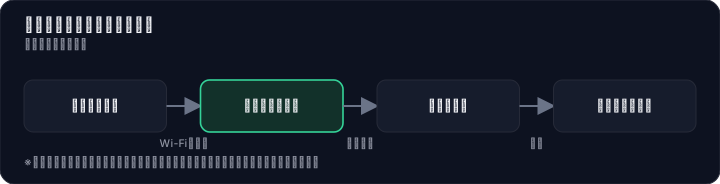
Step 1: Order the device from the official website or an online store Simply select the model with the initial 100GB included and place your order. Orders placed by 3:00 PM are shipped the same day, so it's reassuring even for those in a hurry.
Step 2: After the device arrives, just turn it on and start using it immediately Since it comes pre-configured, no activation procedures are needed. Open the box, power it on, and you can use WiFi right away. Reviews on Rakuten also praise the fast delivery, with comments like "it arrived right after I ordered."
Step 3: When you run out of data, top up via the dedicated app or website You can easily check your remaining data balance in the app. You may need to enter the IMEI number when topping up, but once registered, subsequent top-ups are smooth.
Step 4: Topped-up data is valid for 365 days Any unused data carries over to the following month, so nothing goes to waste. Only what you need, when you need it—this simplicity is Neo Charge WiFi's greatest strength. In just a few minutes, you can get online. If you don't use it, the cost is zero. That's more than enough reason to give it a try.
Summary: A Smarter Internet Life with NeoCharge WiFi
In the end, Mr. Kenta Tanaka decided to purchase NeoCharge WiFi. The deciding factors were three: "No charge in months you don't use it, so no wasted fixed costs," "No binding contract periods or cancellation fees whatsoever," and "You can use it quickly whenever you need it, whether on a business trip or at home." All of these fit perfectly with his work style and lifestyle.
NeoCharge WiFi isn't the best service for everyone. However, for people who use little data per month and want to avoid contract commitments, it's an unbeatable option. While there is an initial cost, in the long run it often works out cheaper than monthly plans. Above all, the freedom to "use it only when you want" is a value hard to find with other services.
If you, like Mr. Tanaka, are thinking "I want to use WiFi without installation" or "I want to review my monthly fixed costs," start by checking the latest conditions on the official website. The application process takes just a few minutes, and you can start using it as soon as the device arrives. The risk is surprisingly small. So why not take that first step?
Note: The information in this article is based on publicly available data as of July 2026. Rates and campaign details are subject to change without notice. Please always check the official website for the latest terms. Internet speeds may vary depending on your environment, time of day, and network congestion. This is not an "unlimited" service. Under fair usage policies, speed restrictions may apply for excessive data usage in a short period.
Methodology and Disclosure
Verification Method: This article is based on information confirmed as of July 31, 2026. The editorial team has not actually signed up for or used the services mentioned. All content is based on publicly available information (official websites, third-party reviews, and user feedback). Service details, fees, and promotions are subject to change, so please check the official information before signing up.
Editorial Information: The editorial policy and evaluation criteria for this article are described in the Editorial Policy, and the verification process is detailed in the Evaluation Method. If you find any errors, please report them to our contact desk.
Affiliate Disclosure: This article contains affiliate links. We may earn a commission at no additional cost to you. Compensation does not affect our evaluation.
Frequently Asked Questions
Do I need a contract or credit check?
No, NeoCharge WiFi has no contract period, no cancellation fees, and no credit check. You can use it immediately after purchasing the device. However, returns for personal reasons are generally not accepted.
Do I have to pay for months I don't use it?
No, months with no usage are ¥0. You only pay when you top up data, and the purchased data is valid for 365 days and can be rolled over.
What is the internet speed like?
Maximum download speed is 150 Mbps and upload is 50 Mbps (4G LTE). However, due to the cloud SIM nature, speeds may be slower than direct smartphone connections, making it unsuitable for high-resolution video streaming or online gaming.
Is the device expensive?
The device costs between ¥17,500 and ¥20,000 (with conditions: includes an initial 100 GB data pack). Since it's a pay-once model with no monthly fees, it can potentially be more cost-effective than monthly plans over the long term.
Can I return or cancel the service?
There are no cancellation fees and no contract period, so you can cancel anytime. However, returns for personal reasons are generally not accepted. The device arrives pre-configured and ready to use.
Can I use it overseas?
The article does not mention international use. The service is intended for domestic use in Japan, and overseas availability is not specified.
How do I top up data?
You can purchase data as needed through the dedicated app or website. You may need to enter the device's IMEI number. Purchased data is valid for 365 days.
Can I use it in a car?
Yes. User reviews mention using it exclusively in a car. The battery lasts about 20 hours continuously and can also be used as a power bank.
Sources
This article is based on publicly available information as of 2026-07-31.
- neochargewifi.jp
- kaisen-hakase.com
- chat-wifi.com
- chasksite.com
- neocharge.shopselect.net
- retro.co.jp
- soregadaiji-wifi.com
- uan.bikkeys05burogu.com
- neocharge.shopselect.net
- Rakuten Market: NeoCharge WiFi Rakuten Market Store [Company Info]
- nodusbleu.co.jp
- pocketwifi-hikaku.info
- review.rakuten.co.jp
- helpful-magazine.com
Related articles
2026 FXTF Account Opening Guide: How to Choose a Domestic FX Broker for Free
Considering opening an FXTF (Golden Way Japan) account in 2026? Compare spreads, trading tools, and support across three key areas. This guide explains how to open an account for free and evaluate the trading environment using the actual platform.
XM No Deposit Bonus 2026: Eligible Countries List
Check if your country is eligible for the XM $30 no deposit bonus in 2026. Updated list, terms, and step-by-step verification guide.
IwaiCosmo Securities Review 2026: Honest Look at Fees and IPO Lottery Odds, Plus Zero-Fee NISA
Get the latest 2026 review of IwaiCosmo Securities. We take an honest look at their strong IPO underwriting track record, zero trading fees for NISA accounts, overall fee structure, and customer support. Compare with major online brokerages.