Verification Status: This article is an explanation based on publicly available information (no actual usage or trading by the editorial team).
One morning, after remote work had become the norm, Taro Yamada (38), head of the IT department at a mid-sized tech company, sighed as he read a message on the company chat: "My home IP address changed, and I can't connect to the internal server. Please help urgently."
Since more than half of the company's 200 employees shifted to remote work, this exchange has become a daily routine. To protect sensitive company data, access is restricted by IP address, but each employee's home connection uses a dynamic IP that changes frequently. Every time this happens, someone has to log into the management console and update the allowed list—a tedious process where a single mistake could bring operations to a halt. The sales team, who often use public Wi-Fi, have also voiced concerns: "Is the coffee shop's connection really safe?"
As the IT manager, he thought, "This can't go on." Many others likely face the same dilemma. This article takes a closer look at the corporate VPN service "SUIKA VPN Team IP," which unifies the entire team's connection sources under a single fixed IP, and evaluates its value in concrete terms.
Bottom Line: SUIKA VPN Team IP offers high security by using a dedicated server that does not share an IP with other companies, along with a 30-day free cancellation guarantee to minimize implementation risk. For IT managers overwhelmed by IP restriction management, it could be a fundamental solution.
The Growing IP Management Headache of Remote Work – Mr. Yamada's Case
The first task Mr. Yamada tackles when he comes into the office is processing "IP whitelist update requests." From the previous night through this morning, four employees had their IPs change. He checks each new IP and adds it to the company server's access control list. When changes pile up, past entries balloon, and forgetting to remove a former employee's IP has caused close calls more than once.
These challenges aren't unique to Mr. Yamada's company. According to public information from multiple VPN comparison sites, mid-sized and small businesses adopting remote work generally face the following common issues:
- Dynamic IP management burden: Employees' home connections frequently change IPs, requiring manual updates to permission settings each time.
- Public Wi-Fi security concerns: Free Wi-Fi used at client sites or on the go often lacks sufficient encryption, leaving communication vulnerable to eavesdropping.
- Access control silos: When one person handles all IP restriction settings, handovers during vacations or job rotations tend to stall.
Mr. Yamada starts thinking, "If only I could consolidate all employees' connection sources into a single fixed IP, so that no matter who accesses from where, the same permission settings would apply." While there are many VPN services, options for business plans offering a shared fixed IP for teams are far from abundant. Then, at a study group with peers, he hears the name "SUIKA VPN Team IP" for the first time. Rumored to unify team IPs via a dedicated server model, Mr. Yamada immediately opens the official website on his smartphone.
What is SUIKA VPN Team IP? Three Solutions You Get with a Dedicated Fixed IP
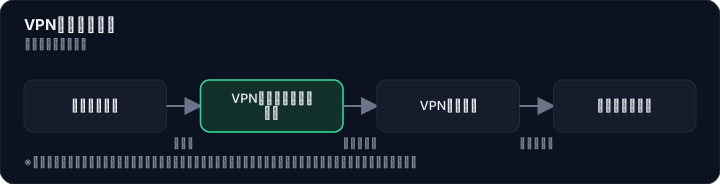
SUIKA VPN Team IP is a service that builds a dedicated VPN server for businesses, unifying the connection source IP of the entire team into a single fixed IP. The key difference from standard consumer VPNs is that the server itself is not shared with other companies. Based on information aggregated from multiple VPN review sites, this "exclusivity" is the service's biggest feature, directly addressing the challenges faced by IT managers like Mr. Yamada.

Let's break down the three solutions based on the specific concerns Mr. Yamada had.
① Eliminate the Hassle of IP Management Completely
When employees connect to the SUIKA VPN Team IP dedicated server from home or on the go, the internal system always recognizes the access source IP as a single fixed address. This eliminates the need to manually update the allowlist every time an IP changes, making Mr. Yamada's morning routine unnecessary. Blocking access for departing employees is also as simple as deactivating their VPN account.
② Stay Safe on Public Wi-Fi with 256-Bit Encryption
Communications are protected with 256-bit encryption, so there's no risk of data flowing in plaintext over external networks. According to the official website, supported devices include Windows, Mac, Android, and iOS, and a key point is that no dedicated software installation is required—it can be set up using the OS's standard features. This provides a clear answer to the concerns raised by the sales team, like, "Is that random Wi-Fi really safe?"
③ Full Control Over Team-Based Access
Needs like "I want a different fixed IP for each work team" can be met by flexibly assigning dedicated servers. A review on a comparison site highlighted a use case where "by assigning different connection servers to each sub-team, you can apply granular IP restrictions on cloud services." This brings Mr. Yamada quite close to his vision of "unifying everyone's access."
After this research, Mr. Yamada's expression softened a bit. However, as the IT department leader, his next concern is "the cost."
Complete Breakdown of Pricing Plans – Is It Really "Expensive"? The Truth About Cost Performance
The pricing structure listed on the official SUIKA VPN Team IP website (as of July 2026, tax included) is as follows. The base plan is a dedicated VPN server with 20 accounts, with three plans available depending on the connection method.
| Plan (Connection Method) | Monthly Fee (Tax Included) | Key Features |
|---|---|---|
| PPTP / L2TP Type | 21,560 yen | Easy setup on a wide range of devices |
| IKEv2 Type | 25,850 yen | Focuses on stronger encryption and stability |
| IKEv2 + PPTP / L2TP Type | 33,550 yen | Allows use of both methods for high flexibility |
- Additional Accounts: 4,400 yen / month per 10 accounts
- Log Retention Option: 110 yen / month per account
- Initial Fee: 0 yen
- 30-Day Free Cancellation Guarantee: Yes
"Personal VPNs cost just a few hundred yen a month, so isn't over 20,000 yen expensive?" — Mr. Yamada felt the same way honestly. However, this is because a shared-server VPN for personal use is being compared on the same level as a dedicated-server VPN for business use. According to public information from multiple VPN comparison sites, services offering dedicated servers that do not share IPs with other companies at this price point are limited, placing it at a reasonable level for business fixed-IP solutions.
Furthermore, in cases where multiple locations have separate VPN contracts, it has been pointed out that consolidating to SUIKA VPN Team IP could lower total costs. Above all, since it comes with a 30-day free cancellation guarantee, there is zero financial risk even if "the speed is slower than expected after implementation" or "it doesn't fit the company." Mr. Yamada is leaning toward opening the inquiry form on the official website, thinking, "Let's at least hear what they have to say for now."
Even as a preliminary step before applying, simply being able to consult about your company's challenges through a free inquiry provides a major clue for organizing the current situation. Since you can find the optimal plan through dialogue with a representative, it's reassuring that you can take action easily even if you're still unsure about implementation.
Real User Reviews & Ratings ─ An Honest Look at the Praise and Some Complaints
When considering adoption, Mr. Yamada was most concerned with "how actual users feel about it." An analysis of reviews posted on multiple review sites and articles shows that while the majority of feedback is positive, there are also some noteworthy criticisms mixed in.
The reviews posted on review sites primarily highlight the following themes:
High Convenience: Many reviews praise the ability to fix a team's IP address. On one review site, a user posted a concise compliment:
Highly convenient
This reflects the relief of being freed from time-consuming IP management.
Ease of Setup: The speed of being able to start using the service on the same day with zero initial cost, along with the simplicity of completing the setup using only the OS's standard features, are highly valued. In particular, mentions of the setup speed, such as "I was able to start operations the same week I applied," are reassuring for those handling urgent projects.
Communication Speed: On the other hand, a small number of comments mention:
The communication speed is slow
Communication speed depends on the user's existing network environment and physical distance to the connection destination, so individual experiences may vary. Another review offers a positive perspective:
It's super snappy
So it cannot be simply dismissed as "slow."
Overall, ratings for security and management are consistently high. As for speed, it would be wise to check compatibility with your own usage environment in advance. The 30-day free cancellation guarantee is essentially designed for this very purpose of "checking compatibility."
Thorough Comparison with Competitors: Why Choose SUIKA VPN Team IP
For comparison purposes, Mr. Yamada also laid out other options besides SUIKA VPN Team IP on his desk. The options that came to mind were: (1) general personal VPNs, (2) "Sekai VPN," a shared VPN with a fixed IP, and (3) a company-owned dedicated line VPN. Based on publicly available information, he summarized each item in a table.

| Comparison Item | SUIKA VPN Team IP | Sekai VPN (with Fixed IP) | Personal VPN (General) | Company-Owned Dedicated Line VPN |
|---|---|---|---|---|
| Monthly Cost (Estimate) | From 21,560 yen | From 5,500 yen | From a few hundred to a few thousand yen | From several hundred thousand yen |
| Fixed IP Provided | Yes (Dedicated) | Yes (May be shared) | No | Yes |
| Dedicated Server | Yes | No (Shared type) | No | Yes |
| Initial Cost | 0 yen | — | Mostly 0 yen | High (installation fees, etc.) |
| Setup Speed | As fast as same day | — | Same day | Several weeks or more |
| Japanese Support | Yes (Weekdays 10:00–18:00) | — | Limited | Depends on the vendor |
| Max Simultaneous Connections | Up to 50 devices (depending on protocol) | — | About 5–10 devices | Typically unlimited |
| Suitable Organization Size | Mainly mid-sized and small-to-medium enterprises | Small teams to sole proprietors | Individuals | Large corporations |
Looking purely at cost, Sekai VPN and personal VPNs come out ahead. However, for companies like Mr. Yamada's that need to "strictly manage the connection source IP" or where "shared types leave concerns for security audits," the advantage of SUIKA VPN Team IP, which uses a dedicated server so IPs don't overlap with other companies, is clear. While a company-owned dedicated line VPN is impeccable in terms of security, the several-week construction period and high initial investment are bottlenecks, often making it overkill for mid-sized companies.
Ultimately, SUIKA VPN Team IP is a service strongly recommended for teams where two conditions overlap: "I absolutely do not want to share a fixed IP with other companies" and "I can't afford to spend time on setup." Mr. Yamada's case fits this perfectly. It solves both management workload and security at once, keeping implementation risk nearly zero, which sets it apart from other options.
Onboarding Process and Support ─ 4 Steps from Application to Same-Day Activation
All the key considerations are in place. As a final step, Mr. Yamada checks "how the actual application process works." After reviewing the official website and multiple review sites, the onboarding flow turns out to be surprisingly simple.
Step 1: Submit required details via the inquiry form Simply enter your company name, desired plan estimate, team size, and other details into the form on the official website. No complex advance preparation is needed at all.
Step 2: Consultation with a representative and proposal of the optimal plan A sales representative contacts you to discuss your current network setup and the issues you want to solve. In Mr. Yamada's case, since the main challenge was integrating IPs across multiple locations, they were able to propose the best connection method and an estimated number of accounts.
Step 3: After signing the contract, a dedicated VPN server is built (as fast as same-day) According to the official website, server setup begins immediately after the contract is signed, and in short cases, connection details are issued within the same day. Since no physical on-site work by a contractor is required, this rapid start is possible.
Step 4: Apply VPN settings to each employee's device Using the issued server information, each employee configures the OS-standard VPN function on their own PC or smartphone. There is no need to distribute a dedicated app or provide complex manuals, and Mr. Yamada's team is likely to be surprised, asking, "Is that all there is to it?"
Japanese-language support is available from 10:00 AM to 6:00 PM on weekdays as a backup, allowing remote assistance for any employees who struggle with the setup. The 30-day free cancellation guarantee reinforces the feeling that "there's no reason not to give it a try first." Mr. Yamada gripped his mouse again and quietly clicked the form's submit button. The first step toward fundamentally changing how his team works had just been taken.
The content of this article is based on publicly available information as of July 2026. Fees and specifications are subject to change without notice, so please check the official website for the latest terms. Please note that the introduction of this service does not guarantee improved corporate performance or operational efficiency; actual results will vary depending on each organization's environment and operational conditions.
Methodology and Disclosure
Verification Method: This article is based on publicly available information as of July 28, 2026. The editorial team has not actually subscribed to or used the services in question. This content is based on publicly available information (official websites, third-party reviews, and user feedback). Service details, fees, and promotions are subject to change, so please check the official information before applying.
Publisher Information: The editorial policy and evaluation criteria for this article are described in the Editorial Policy, and the verification procedures are outlined in the Evaluation Methodology. Please report any errors through our contact form.
Affiliate Disclosure: This article contains affiliate links, and our site may receive compensation at no additional cost to readers. Compensation does not affect the evaluation content.
Frequently Asked Questions
What is the monthly fee for SUIKA VPN Team IP? How do plans differ?
PPTP/L2TP plan is ¥21,560/month, IKEv2 plan is ¥25,850/month, and combined plan is ¥33,550/month (all tax-inclusive, conditions apply). Additional accounts are ¥4,400/month per 10 accounts.
Can individuals use it? Can I sign up alone?
It is a business-oriented service, but sole proprietors and freelancers can also use it. However, since the basic plan includes a dedicated server with 20 accounts, using it alone may be relatively expensive.
Is the connection speed sufficient? Will it hinder work?
Since it uses a dedicated server without sharing bandwidth with other companies, sufficient speed can be expected for general business use. However, large file transfers may depend on the environment.
Is setup difficult? Do I need to install special software?
It can be configured using the OS's standard VPN function, and no special software installation is required. Setup guides are available on the official website, and it is not difficult for those with high IT literacy.
Are there penalties for cancellation? Is it really free within 30 days?
There is a 30-day free cancellation guarantee, and a full refund is provided within that period. Cancellations after that are on a monthly basis with no early termination fees.
Which devices are supported? Can I use it on Windows, Mac, iPhone, and Android?
It supports Windows, Mac, Android, and iOS. Connection is possible using each OS's standard VPN function.
Is the fixed IP truly not shared with other companies? How does it work?
Since a dedicated server is assigned, the IP address is not shared with other companies. The server is exclusively for your company, and the connection source IP is always the same fixed IP.
Is support available in Japanese? What are the contact methods and business hours?
Japanese support is available. Inquiries can be made via email or chat, and business hours are weekdays from 10:00 to 18:00.
Sources
This article is based on publicly available information as of 2026-07-28.
Related articles
XM Review 2026: Video Walkthrough, Spreads & Bonus Terms Explained
XM review 2026 with full video walkthrough. Regulated broker, spreads from 0.6 pips, no-deposit bonus explained. ✓ Verdict for beginners ✓ Risk disclosure ✓
Measured broker spreads 2026-W41 — logged hourly from our own MT5 accounts
Not a copy of published spread tables: 184,090 hourly bid/ask samples taken on our own accounts (HF Markets (SV) Ltd. / OANDA Corporation / XM) over 2026-09-27 → 2026-10-04, broken down by pair and by hour of day.
Fujitsu vs KDDI AccelWaves vs SCS: Enterprise Security 2026 Guide
Compare Fujitsu MSS, KDDI AccelWaves SASE, and SCS certification for Japanese enterprises. Find the right fit with our 2026 decision guide ✓